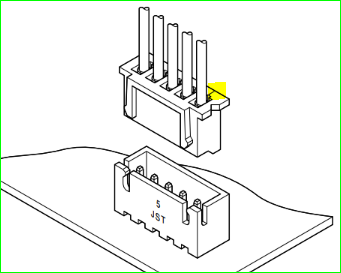
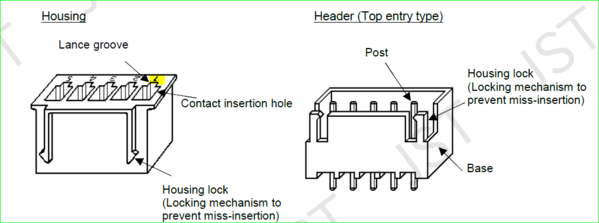
I have a question for the pins of JST-XH-A.
Added 3 years, 1 month ago.
5 Answers
Hello there,
Thanks for flagging this part! Let me check this with our engineers and we will keep you posted for more updates.
Thanks again!
Ron
Answered 3 years, 1 month ago.

Hi there,
I'm Oscar stepping in for Ron. I hope you are doing well. After checking, our team didn't find an issue with this part. We based the pin sequence on these two documents. Please check:
https://www.jst.com/wp-content/uploads/2021/01/eXH-new.pdf
https://snapeda.s3.amazonaws.com/datasheets/CHM-1-151.pdf
And please check the example images:
https://snapeda.s3.amazonaws.com/images/Example+1.png
https://snapeda.s3.amazonaws.com/images/Example+2.png
Please let me know if you have any questions.
Best regards,
Oscar
Answered 3 years, 1 month ago.

sstoilov is correct, the pins are backwards and is very much seen in the example 2 image. This is very much the case for the BXB-XHA connectors. This ruined my placement on a breakout board I designed thinking the model was correct. The pins go right to left, might want to check the footprint once more.
Answered 3 years ago.
Let me fix my response, this is for the BXB-XHA(LF)(SN) connectors not the BXB-XHA connectors, did a few more checks.
Answered 3 years ago.
Hello, this is Carlos from SnapEDA, thanks for notifying us. We have checked the BXB-XHA series, and we have fixed the remaining instances of user uploaded parts. Now, all parts are under SnapEDA standards.
Please note that as depicted on page 2 of the datasheet, the pin locations go slightly to the bottom when seen from the center of the part.
Please let us know if you need anything else. We'd be happy to help!
Answered 3 years ago.